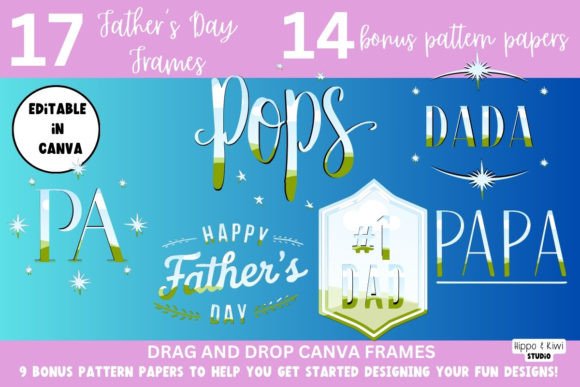
Father's Day Canva Frame Templates 2: Create Heartfelt Designs
Creating a meaningful Father's Day design shouldn't require advanced software skills or hours of frustration. The Father's Day Canva Frame Templates 2 offers a straightforward solution for anyone looking to produce professional-looking graphics quickly. This editable Canva frame template works seamlessly in both free and Pro versions of Canva, making it accessible to virtually everyone with an internet connection.
What Makes These Frame Templates Stand Out
The visual personality of these templates strikes a balance between warmth and sophistication. They feature clean lines and thoughtful layouts that accommodate various photo orientations without feeling cluttered. The frames themselves have a modern aesthetic that avoids being overly sentimental or dated—perfect for contemporary branding and personal projects alike.
What sets Father's Day Canva Frame Templates 2 apart is its versatility. The designs work equally well for a small business owner creating social media graphics, a blogger developing branded content, or a parent putting together a personalized photo gift. The templates provide structure while leaving ample room for creative customization.
Practical Applications Across Different Projects
For entrepreneurs and small business owners, these frame templates offer an efficient way to create Father's Day promotions without hiring a designer. Retail shops, restaurants, service providers, and e-commerce brands can use them for social media posts, email headers, and website banners that feel personal rather than generic.
Content creators and bloggers will appreciate how quickly they can produce consistent branded graphics. The drag-and-drop functionality means you can maintain your visual identity while celebrating the holiday. Drop in your brand colors, add your logo, and incorporate relevant images to create graphics that feel authentically yours.
For personal projects, these templates shine in creating photo collages, digital greeting cards, and printable designs for family celebrations. The ability to save in multiple formats—JPG, PNG, PDF—means you can use your creations both digitally and in print. If you have Canva Pro, saving with a transparent background opens up even more possibilities for layering designs.
Working with the Included Design Assets
The package includes 14 bonus digital papers that expand your creative options significantly. These patterns and textures work beautifully as backgrounds within the frames, adding visual interest without overwhelming your photos. Think of them as ready-made design assets that help establish mood and style in your compositions.
When choosing digital papers, consider the overall tone you want to set. Subtle textures might work well for elegant, professional designs, while bolder patterns could suit more playful, casual projects. The key is ensuring the background enhances rather than competes with your focal images.
Streamlining Your Design Process
The included video tutorial demonstrates the drag-and-drop process step by step. While the tutorial uses Mother's Day frames as its example, the technique applies identically to Father's Day designs. Watching someone navigate the interface once saves considerable trial and error later.
Start by selecting your frame template and uploading the photos you want to use. Drag images directly into the frame placeholders, then adjust positioning as needed. From there, experiment with the digital papers, color adjustments, and any text elements you want to add. The process feels intuitive even for those new to Canva.
Considering Your Audience and Project Goals
Before diving into customization, think about who will see your finished design and what impression you want to create. A Father's Day graphic for a men's grooming brand will have different visual requirements than one for a family photography studio or a children's craft blog.
The frame templates provide neutral starting points that adapt to various contexts. A marketing professional might keep things minimal with corporate colors and clean typography. A crafter might layer multiple textures and use handwritten-style fonts for a more personal touch. The template structure supports both approaches without forcing either.
Maximizing Quality and Format Options
Understanding file format options helps you get the most from your designs. JPG works well for web use and social media where file size matters. PDF maintains quality for print projects. PNG preserves transparency—particularly useful if you want to overlay your framed design onto another background or composite image.
One important note: transparent PNG saving requires Canva Pro. For those working regularly with design assets and needing that flexibility, the Pro subscription often justifies itself through features like this. However, the free version handles JPG and PDF exports perfectly well for most standard applications.
Building Consistent Visual Content
Father's Day represents just one opportunity in a calendar full of design needs. The skills you develop working with these frame templates transfer directly to other projects throughout the year. Understanding how to manipulate frames, layer elements, and export properly builds practical design literacy that serves you repeatedly.
Consider creating a small library of finished designs using Father's Day Canva Frame Templates 2 as your practice ground. Save variations with different color schemes, photo arrangements, and text treatments. These become reference points for future projects and help you develop an intuitive sense for what works visually.
The combination of ready-made templates, bonus digital papers, and accessible video guidance makes this package genuinely useful for anyone who needs to create Father's Day designs efficiently. Whether you're building social media graphics for a brand or assembling a personal photo keepsake, having structured starting points accelerates the creative process while maintaining quality results.